

Smartphones have indisputably changed how we drive. While dodging distracted drivers playing Candy Crush at 70 MPH is a serious problem, the little slab of occasional horror in your pocket also brings convenience. Using voice controls to switch playlists is a whole lot easier than unzipping a binder full of CDs, finding the one you want, pressing eject, and swapping the new disc in. Hands-free calling lets you keep both hands on the wheel instead of one on a comically large car phone handset. However, the biggest advancement is that everyone now has GPS navigation with live traffic data everywhere they go. Unfortunately, if you’re an Apple Maps user, that navigation experience is about to get slightly worse.
This week, Apple announced a new way to make even more money. It’s called Apple Business, and it’s touted as a way of managing office tech and brand marketing alike. While some of the employee management and branding functions seem useful, there’s one mildly annoying feature in this set:


Beginning this summer in the U.S. and Canada, businesses will have a new way to be discovered by using Apple Business to create ads on Maps. Ads on Maps will appear when users search in Maps, and can appear at the top of a user’s search results based on relevance, as well as at the top of a new Suggested Places experience in Maps, which will display recommendations based on what’s trending nearby, the user’s recent searches, and more.
Apple certainly isn’t the only tech company to embed ads and promoted results in its navigation apps. Google Maps has done this for ages with mildly aggravating results, and Google-owned Waze will flash banner ads when you’re stopped if you’re using it on a mounted phone. It’s also worth noting that other navigation apps don’t flash ads through Apple CarPlay, and with no announcement on whether ads are coming to Apple Maps in CarPlay, don’t expect them to appear on your car’s built-in screen.
However, what if your car doesn’t have Apple CarPlay and you simply put your phone on a legal mount for navigation? For those of us without in-car infotainment, that’s just the way we avoid getting lost. If you’re an Apple Maps user based in the U.S. or Canada and drive something pre-2016, this means ads are probably coming to your dashboard in a roundabout way. Eww.
It all follows the familiar enshittification playbook: Launch a free-to-use service that’s clean and fast, then once users are hooked, start cluttering up the place with ads you didn’t want and top search results that aren’t necessarily what you’re looking for. Let’s say you have a loyalty card for, I don’t know, Shell. One fat-fingered move on an ad, and you might find yourself driving to an Esso. Or you might end up at the wrong combination Pizza Hut and Taco Bell miles from the one you promised to meet a friend at.
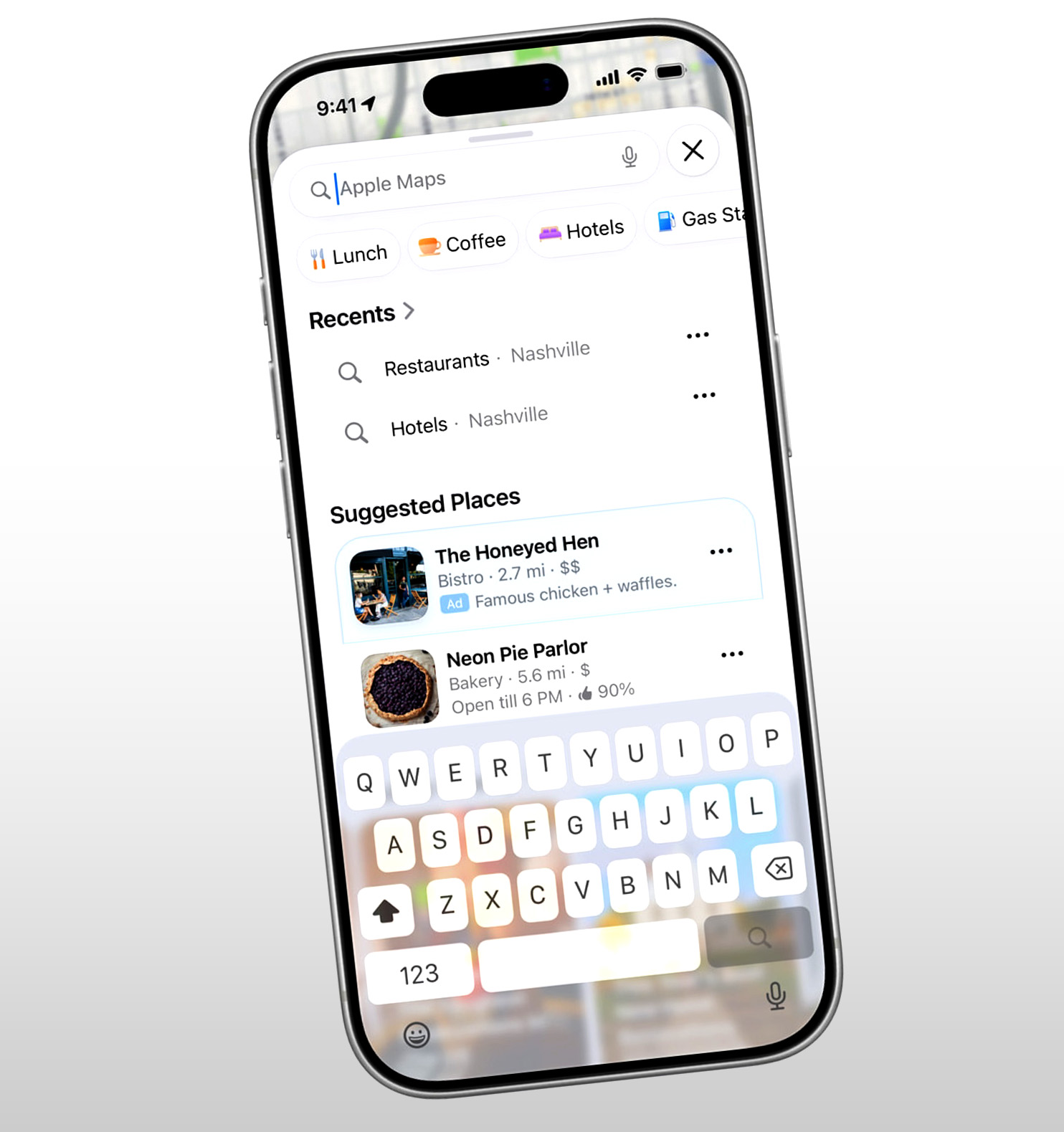
Granted, it does seem like there are some enhanced privacy measures at play. As Apple stated, “A user’s location and the ads they see and interact with in Maps are not associated with a user’s Apple Account. Personal data stays on a user’s device, is not collected or stored by Apple, and is not shared with third parties.” Still, the impending arrival of ads to Apple Maps means the number of clean, sleek navigation apps is dwindling.
There Are Still Alternatives
So what can we do? Well, you have a couple of options. You could throw up your hands and go with whichever ad-laden navigation app works best for driving. I still find that Waze works fairly well, although it doesn’t have the same route-you-through-someone’s-backyard-to-save-two-minutes verve it used to. However, if you’re not going to take that, you still have options.
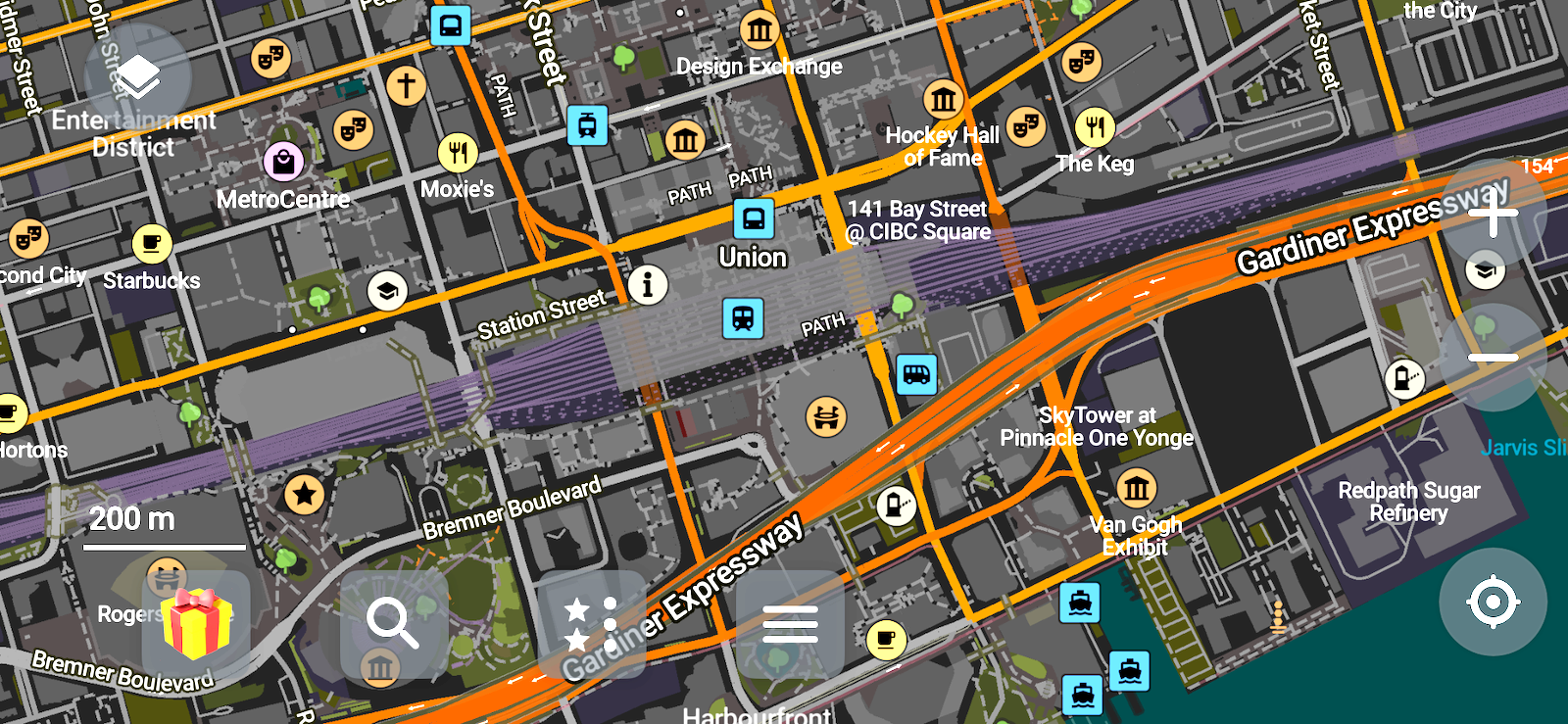
Right off the rip, Organic Maps reminds me of the old internet, when someone would build something cool out of love, and PayPal donations would sustain it. Based on OpenStreetMap data, it can run entirely offline, has no ads or trackers, and goes one level deeper with stuff like parking garage entrance locations and park amenities, regardless of whether you’re driving, hiking, or cycling. The main downsides are that it doesn’t do live traffic, and it doesn’t always have the most up-to-date points of interest, but it’s slick and great for areas with patchy data service.
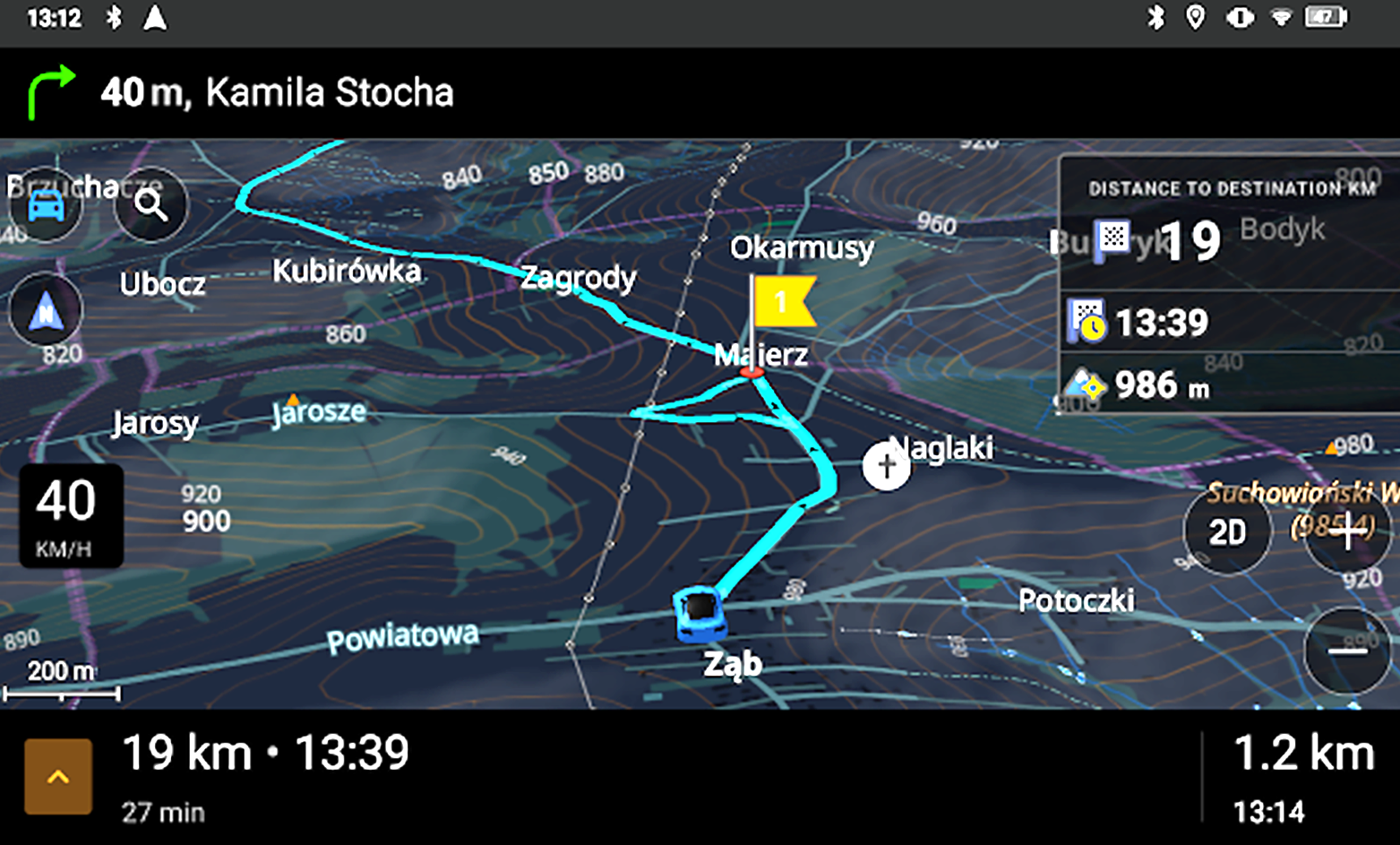
In a similar vein, OsmAnd is based on OpenStreetMap data, doesn’t have ads, and promises not to sell your location data. However, it charges a fee for certain features. Seven map downloads and offline navigation are free, but things like Apple CarPlay and Android Auto support, more frequent map updates, contour lines, and offline weather reports are locked behind premium tiers. Considering the app’s been supported for more than 15 years, this seems like an easy and solid option for those who just want to swipe a card. Then again, it’s also a reminder that these days, we often have to pay to not be the product.
Or maybe not, if you want to put in the work. Earlier this year, YouTuber Garage Tinkering published an incredibly cool video. You know how our favorite open-world racing games usually have mini-maps? Well, he made a fully functional mini-map on an ESP32 chipset using QGIS, survey map data, and OpenStreetMap data. It’s a bit of a long process, requiring breaking down maps into zillions of tiles. Garage Tinkering even wrote a little Python script to make things easier. Still, the end result is spectacular and something you could make for minimal coin if you’re resourceful.
Regardless, the impending arrival of ads to Apple Maps means navigating unfamiliar areas without being fed ads is about to get a little harder. Mildly annoying for those of us who drive older stuff, but annoying nonetheless.
Top graphic image: Apple



Just tease me with a pretty NC1 and then don’t say anything about it. Yeah, you got me to click, even with an Android phone running Waze.
I expect this to not be as helpful as they are claiming it will be; I predict that within a year there will be ads for boner pills, or medication for people with moderate to severe eczema. If we’re lucky there will be a screen takeover video of David buying a brand new WWII Jeep engine from France.
I prefer Apple Maps to Google Maps because Google but I generally use the former for navigation and the latter for POI and high-stakes navigation. Still not great where Apple Maps is with how much resources are at their disposal.
If any folks want to help move away and are interested in a new side-hobby – contributing to OpenStreetMap is something I recommend. It will vary from area to area, but I bet there’s some outdated POI’s and missing address data near you.
I have a Garmin that I use when I want to go somewhere I’ve never been. No live traffic but also no direct internet connection. So that’s good.
My Garmin has some antennae in the power cable that receives (or at least, received, not sure if it works now) traffic data and my headunit receives traffic data via FM radio so there’s still hope there!
Mine has that capability but didn’t come with the cable to do it.
It’s still there, but it only works in pretty major metropolitan areas, at least on mine.
Local AAA offices are stocking up on paper and toner in preparation for renewed interest in hardcopy TripTiks
Ah the days of traveling in the Navy in the late 80s with a TripTik on the passenger seat telling me how to get from Ohio to VA.
Thanks for putting me onto Garage Tinkering. Right up my auto nerd alley.
Fire up America Online and go on Map-Quest, input your route and print out ~5 pages of turn-by-turn directions, like a real man.
Also, You’ve got mail!
People don’t seem to understand that all the magical streaming stuff that shows up on your devices has to be paid for somehow. And providing it gets more and more expensive as time goes on. You can pay in cash, or you can pay with a fairly tiny amount of eyeball time. I would just as soon keep my cash. And I am old enough to where EVERYTHING that you didn’t pay for had lots and lots of ads. I don’t even really notice them.
If you are young enough to have grown up with all this crap being ad-free AND cash free due to magical thinking about how money could be made from it and a willingness to lose vast quantities of OPM for a long time, well, welcome to the real world, best get used to it.
I’m old enough to remember when cable and satellite tv were paid services that didn’t run ads. That was part of the point. But it’s never enough…
But that’s the thing, you paid for it, and it was *expensive*. Today you have a choice much of the time. Free, or at least much cheaper, with ads, or pay real money and be ad-free. I do not watch enough Netflix to pay $20+ for it to be ad-free, but a few ads and $7/mo, sure, why not? Still FAR better than the old broadcast standard of 10 minutes of ads in a 30 minute show, even though it’s “free”.
People who are not in the industry have NO IDEA how much it costs to provide these services at the scale they are provided today (and that cost has gotten WILDLY more expensive post-pandemic) – and then the producers of the content want money too. And unlike in the “good old days”, nobody wants to burn money to get eyeballs anymore. Which was dumb to start with, IMHO. Corporations are not charities.
Where I was going with that is that the things you used to pay for and not have ads you now pay even more for and they slowly snuck ads back in. Enshittification is the rule.
But as a rule you don’t pay more. If you opt into the ads, you pay rather less than what the price was before. I don’t know of a single streaming service where that is not the case, though of course I don’t know all of them.
Expecting any of these services to be completely free forever is completely unrealistic. Services need to be paid for, one way or another.
You could just,… Know where you are going inside your head. No ads ever.
Well except for reruns of JG Wentworth 877 cash now.
As someone with a truly awful innate sense of direction, I cannot recommend this method. 😛
That’s half the fun, you never know where you will end up.
Bigger shame is the people use map apps and their directions even for routes that they know, or when there is exactly one route. I have friends who drive to Wine Country regularly and still put the nav on.
My method:
When with a navigator, I ask them while I’m driving to check the traffic (or ask for several route options) to see if another route is more optimal. Usually before a major fork
But this is more for driving from north-of-LA to south-of-LA. Or into LA. Like a once-a-month trip. Because the better life-choice is not to drive anywhere near LA.
Using the software even on familiar routes is still very useful for a couple of things. I like knowing there is a traffic slowdown ahead, and sometimes I can get an alert and get off the highway and go around it. And cop notifications are a nice thing, and on Google Maps in my area, very reliable. People seem very good about inputting them, and I try to be as well. It’s also helpful to have a pretty accurate and evolving ETA. I had to drive to Tampa today, and that drive can be an 1:20 to 2:00 depending on the level of road stupid that day. It wasn’t a bad day, took me 1:35. Google Maps warned me of the slowdowns, and of two Bears in the Bushes. Useful, despite being a route I could do in my sleep.
I certainly agree that avoiding driving anywhere in or near LA is a very good thing. Thankfully I only go there about once ever few years. Though the Bay area isn’t much better, and I will be there all next week.
This exactly. I drive the same route to work every day, and I always open Waze and start navigation. On several occasions, it has alerted me to the whole highway being shutdown and routed me around it, saving me a solid half hour of sitting stopped on a highway twiddling my thumbs.
Same – I go to Sarasota fairly frequently from my place deeper in God’s Waiting Room, FL. I-75 is somewhat faster if it’s not jammed up vs. the “old road” Rt-41 (higher speeds but 15 miles farther as it’s routed well inland). Google will tell me which way to go. Very useful, that. Though I usually go up one way and back the other, for variety, if no traffic issues either way.
I’ve tried Waze, but it always seems to want to do things that make no sense – like have me get off a random interchange, cross the road, and get right back on again. Now that Google Maps has cop warnings too, I just use that. Apple Maps can die in a fire, despite my being a reluctant iPhone user.
I get that. For hours-long trips with optional routes, checking the traffic is a great idea. I just don’t let the nav app tell me where to go. I can choose a route based on the traffic pattern that I see on the nav app. Yes, I believe I have more knowledge regarding traffic (in LA, at least — elsewhere I HAVE to take suggestions) than the app. 50 years of knowledge.
In LA, there are plenty of optional routes. Just getting to, say, Dodger Stadium, I can choose five different freeway combinations, at least. Then again, most trips into LA involve leaving several hours ahead, arriving early to get food somewhere nearby, taking in a museum, etc. Might as well make a day of it.
Sarasota is less than an hour usually, and I still find it handy. No matter how good your knowledge is, it can’t tell you that there is a crash that is backing up traffic 10 miles ahead of you, so get off NOW because traffic is stopped. Which these apps absolutely can and will do. And that is a near daily occurrence here in Florida Man Land, where the traffic is a wild mix of Cryptkeepers, crazy Latins, Methheads, lost tourists, and BroDozers.
But as the saying goes, you do you.
How else will you know the ETA, so you can try to beat it? 🙂
This makes me happy to have my Ioniq 5. The built in Nav is great. Shows up on the hud and no ads.
GM decision-makers are probably strutting around the room all proud and confident that somehow this will justify them.
It won’t.
-yet.
Manufacturers have pretty much found the limit of what consumers are willing to spend on devices. People are keeping them longer and not feeling like they need the latest flagship. The line’s gotta go up and you’re easy pickin’.
Check it out, a true artisanal navigation system. Crafted from organic fiber (you know, they contain carbon molecules) and brought into spectacular physical form by specialized craftsmanship (pressmen, probably unionized). A concierge option is available with an extra human touch as well.
Highly portable.
Compact.
Requires no power.
And you get a bonus dinner discount on the Moon Over My Hammy you’re hankering for:
https://magazine.northeast.aaa.com/daily/travel/road-trips/paper-maps-triptiks-still/
I got all around the Northeast with these things for a very long time.
Check it out, a true artisanal navigation system. Crafted from organic fiber (you know, they contain carbon molecules) and brought into spectacular physical form by specialized craftsmanship (pressmen, probably unionized). A concierge option is available with an extra human touch as well.
Highly portable.
Compact.
Requires no power.
And you get a bonus dinner discount on the Moon Over My Hammy you’re hankering for:
https://magazine.northeast.aaa.com/daily/travel/road-trips/paper-maps-triptiks-still/
I got all around the Northeast with these things for a very long time.
It’s very annoying to see Apple going down this road. In the past, since most of Apple’s revenue was hardware sales, they could take the high road and claim a focus on privacy and lack of clutter.
As more and more of their revenue comes from “Services”, they are enshitifying the experience that made them better.
Ads are a plague. An iCloud subscription should be an automatic opt-out.
I’ve tried to like osmand as well as various other open source nav apps using open street map data the poi data is always the issue for me and some of the routing is a bit hokey. I tried here maps as well not great. CoMaps a fork of organics maps interface seems worlds ahead of most with more integrations. I use it sometimes. Navit is also interesting but I’m not sure it’s ready for prime time.
Sygic has been around forever the Chinese windows ce head units used to ship with it. Very interesting feature set I know some truckers like it because it can be set for all sorts of conditions and truck routes. The last time I used it I thought it was fine but always go back to Google maps. The apple map people kinda freak me out my sisters use it and always end up going strange ways.
I’m not surprised at all they will put ads in. I was surprised when duckduckgo started using vs mapbox or some other system using open street map data.
Eh, sounds like these ads will be easy enough to ignore.
Maybe I’ve just been ruined by Google Maps, but I already know to skip the promoted results and find what I was actually searching for.
Yeah, I built the habit quickly. It’s manageable at least.
Yes, but Google Maps still doesn’t have any way to turn off notifications that there’s a cop changing someone’s tire up ahead or that you should continue onto the highway after entering the merge ramp that leads nowhere but that highway
Ya mean no one is printing triptiks or mapquests anymore? I never saw an add with those.
I feel like Mapquest printed banner ads but maybe I’m hallucinating.
Sure did
Up until a couple of years ago, I had a co-worker who refused to get a smart phone. When I sent him on errands, I had to give him printed Mapquest directions.
Ads are coming to Apple maps? Let me look up some information about it on Bing, then I’ll make a post about it on MySpace.
I download my directions from Google Maps to my iphone before I go on trips, we often are in areas where there’s no service, including the starting point. I’ve not seen any ad’s doing this. Even when I use it going on trips randomly, it hasn’t done it, and just gets me where I want to go. I don’t like Apple Maps. Google nailed it years ago, everything else is a novelty that doesn’t hold up.
**wasn’t thinking of garmin and tomtom types, those are legit too
I believe the native SatNav in my old BMW is based on TomTom Even with a couple of updates, it can’t find my house on an extension of a named street that’s been there for 20 years. I’ve also had Uber drivers not find my house, because their maps had them in the neighborhood behind me (same as the BMW). I had to wait for the driver to figure out that he could not go through the neighbor’s side yard to get to my house and call me for directions.
There’s also an apartment complex in town that has a sign in the driveway say “GOS is wrong, no access to (X) st.
I’m happy our Garmin GPS came with ad-free lifetime updates.
There’s also no ads (other than showing the location of Wal-Marts) in our Rand McNally road atlases.
Apple Maps? Anyone using that deserves the headaches that come with it xD
I tried Waze once or twice, but full screen ads while trying to use navigation? I stopped. I tried Apple maps and it always suggested going down side street to save a minute that actually added time. I’ve just stuck with Google maps for now.
I don’t know a single iPhone user who actually uses Apple Maps. The fallout from Apple Maps screwup fiasco from however many years ago is still being felt.
My wife does and I’ll never understand why. I’ve always used and preferred Google Maps even on Apple devices.
I’ve taught this stuff for decades and taken an informal poll of students in each class: after years of slow growth, Apple Maps has had an approx. equal number of users in class as Google Maps for the last 3 years
Google Maps didn’t pass MapQuest until the mid-2010s!
Really! That sounds insane to me. But then, I haven’t used Mapquest since I got a Garmin GPS unit back in like 2010, which I replaced with an iPhone with Google Maps and Waze 5 years after that
Fascinating. I wonder if it’s bc they’re too young to have experienced the initial rollout
Likely so
I find Apple Maps has a superior audio UI. Google is “turn right in 900 feet,” so immediately I’m doing mental math, “Hmm, 44 feet per second at 30 mph, so 20 seconds…oh, traffic just slowed, so, uh, 30 seconds?”
Apple is “Go past this light, at the next one, turn right.” Simple, effective, no math.
I was a longtime Waze user until I got tired of being instructed to cut through side roads to then have an unprotected left turn across four lanes during rush hour. Swapped to Google for several years, most recently got rid of Google primarily due to the audio UI saying things like “take the ramp” at a section with three+ options, even looking at the map isn’t particularly helpful in these scenarios.
So I swapped to Apple and have yet to be annoyed.
I only use apple maps when I am driving one of my older cars with no apple carplay where I can launch Google Maps or Waze. Why? Because the directions go to my Apple Watch in a nice graphic way (turn by turn directions) and I can put the phone away since I dont need it. The watch gives you a small vibration when its time to make a turn (Taking an exit for example).