

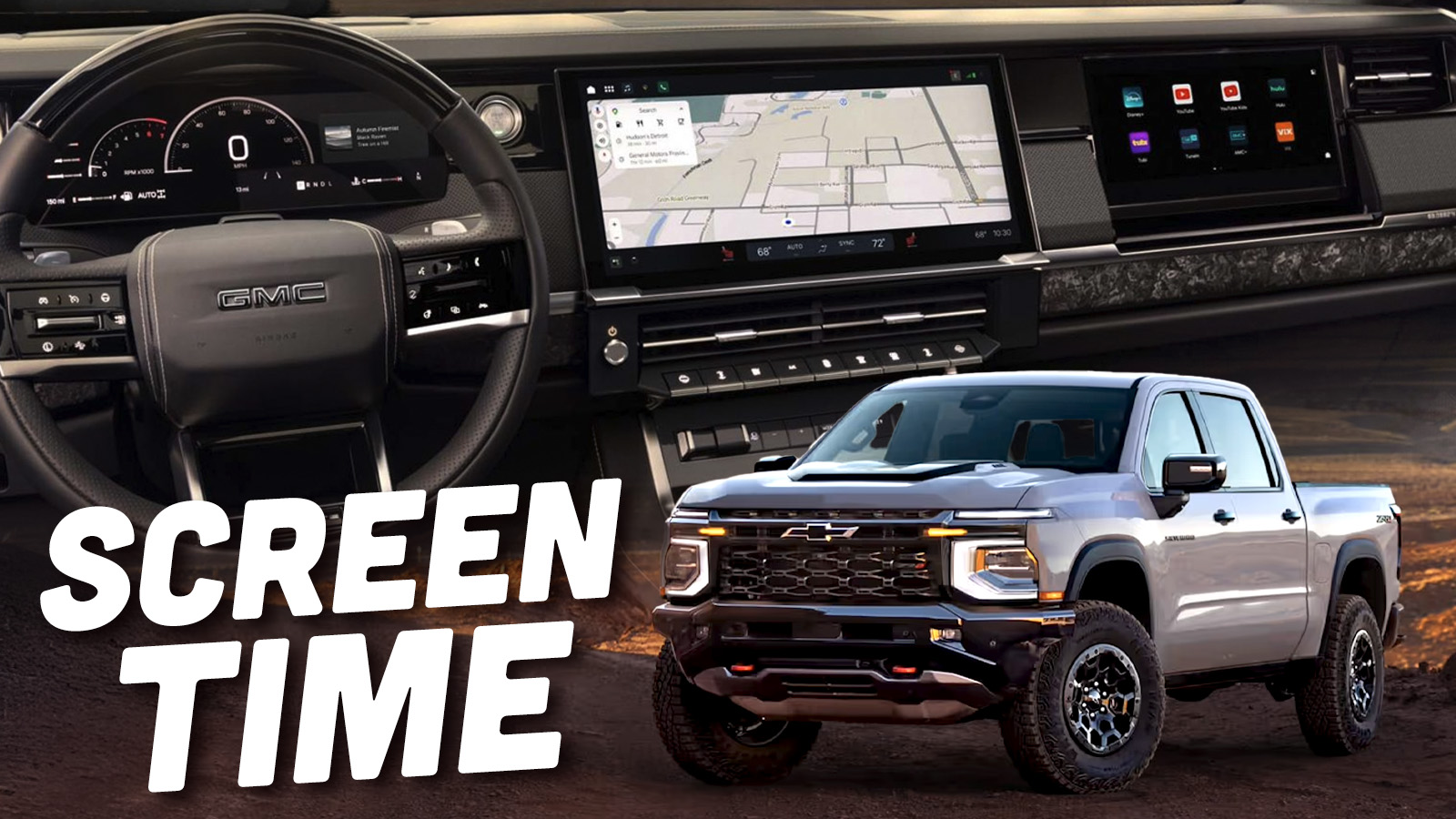
The Chevrolet Silverado and GMC Sierra light-duty pickups are both getting substantial redesigns for the 2027 model year. Apart from updated designs, the biggest changes are the adoption of new, larger-displacement sixth-generation small-block V8s and an all-new interior. GM has yet to share any specs on the engines besides the displacements, but they have given us an early look at the revamped user interface for the infotainment software in the trucks.
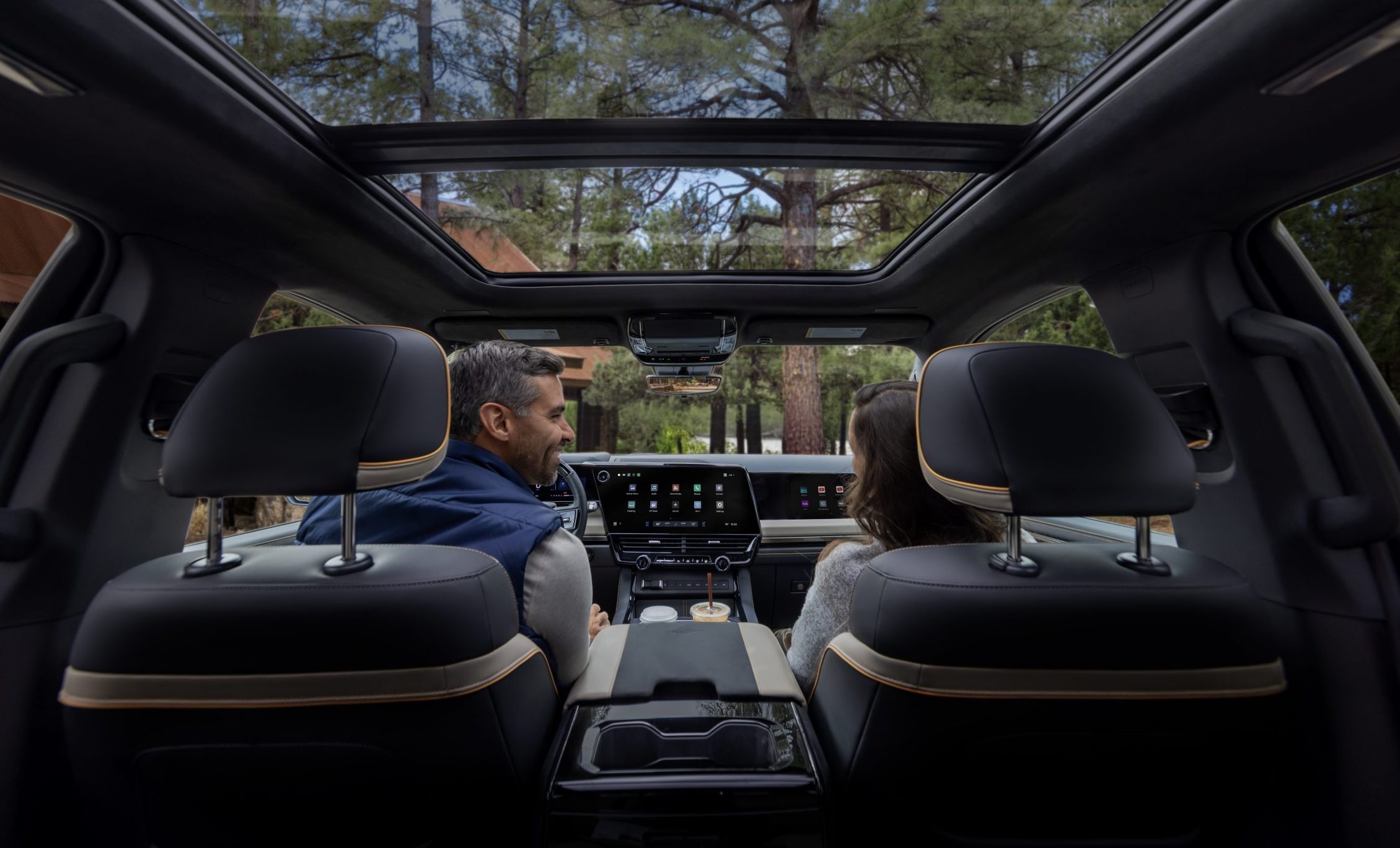
Since it is 2026, it should come as no surprise that both the Silverado and Sierra are getting even more screen than before, both in dimension and number. For the first time, GM is offering a passenger-side screen measuring 11.5 inches across the diagonal. Despite the fact that these third front screens are proliferating across the industry, the actual utility of the extra display remains questionable.


Since virtually everyone has a phone and many of us also have tablets and/or laptops – any of which can be used to watch videos or other content, I’m not sure why we need another display embedded into the dashboard. That said, the passenger display does have a filter on it that makes its contents invisible to the driver.

[Ed Note: Welcome back Sam Abuelsamid, one of the auto industry’s greatest writers/analysts. He tends to get into some nitty-gritty detail, which I like, even when that detail is about a user interface I will probably never own. -DT].
Since the competition has also gone to increasingly large screens, GM is no longer saddling its entry-level models with a diminutive 7-inch screen in the center stack. All of the new trucks get a 12.2-inch instrument cluster display and a 16.3-inch touchscreen as standard equipment, and all the displays are full-array local dimming (FALD) to optimize the contrast and visibility.
So What’s On The Screens?

Like most GM vehicles in recent years, the Sierra and Silverado are sticking with the Android Automotive operating system with Google Automotive Services (GAS). However, it’s 2026, so instead of the old Google Assistant that went along with Google Maps and the Play store, Gemini will now try to answer all of your verbal queries. Whether Gemini’s responses are any more accurate remains to be seen, but since it’s a generative AI model, we can’t rule out the occasional hallucination when you ask the system to navigate to a point of interest.
Despite some recent comments in interviews with CEO Mary Barra hinting that the removal of smartphone projection like Apple CarPlay and Android Auto would be extended beyond EVs, that hasn’t happened yet on the new trucks. Both phone interfaces remain in place for the foreseeable future.
So the core of the information on the center screen remains intact for 2027, but GM has put some thought into how that content is displayed. The basis remains a grid of icons for the array of functions. Across the top and bottom of the screen are rows of shortcuts and data that are always visible. At the top left is the home button, the app grid, and shortcuts to media, maps, and phone controls. Centered at the bottom are perpetual climate controls showing temperatures for each zone, where the air should flow, and seat heater switches. Most of the same functionality is also available through physical buttons below the screen. As before, you can also adjust the temperature through Gemini by saying “Hey Google.”

In the lower left are some other persistent controls, including a shortcut to all the settings and the touch switch for the lights, which many drivers I’ve talked to don’t particularly like, but at least it’s always there and you don’t have to go hunting for it. In addition to the persistent controls, other functions will pop up in that bottom row as needed. For example, GM has built in a garage door opener control that can be programmed to open your door. When you are in proximity to your driveway, that button will automatically appear so you can open your garage with a single tap and as you drive away, it also leaves the screen so it’s not cluttered with irrelevant controls.
The big chunk in between is where GM has started to make some changes. Jace Stokes, Staff Product Manager – UI, General Motors, explained, “We’ve done a lot of UX (user experience) research, and we’ve found that our users really like to live in the split screen view.” GM has had a split-screen view available on its Android systems since the beginning, with two panes divided roughly ⅓- ⅔.
But until now, the smaller pane has always been on the right, further away from the driver. Typically, when people use the split screen, the map is in the larger pane while the smaller pane holds something like the media playback controls. When you’re driving, you’re more likely to be interacting with the media controls to pause, go back, or skip forward. Having that on the far side of the screen makes it a longer reach, so GM has swapped the positions, putting the small pane on the left. It seems like a little detail, but it should definitely make the system a bit more usable.
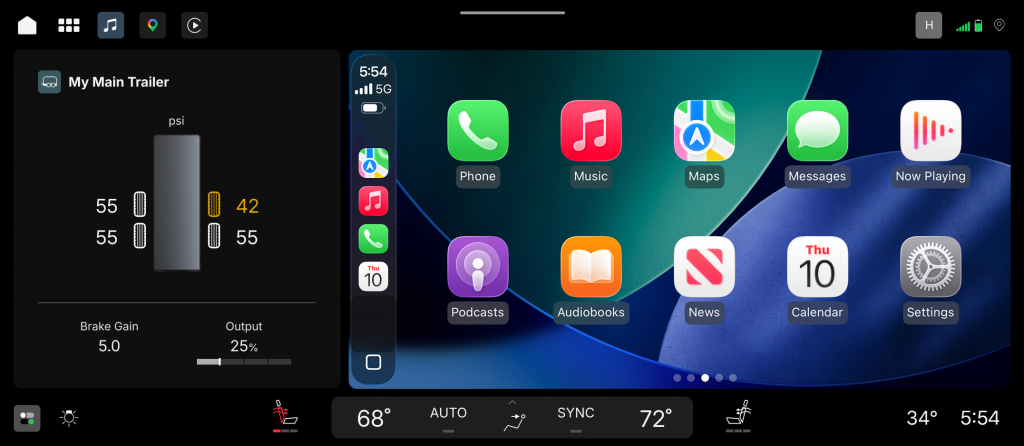
For those who choose to utilize CarPlay or Android Auto, that interface will show up in the larger split-screen pane to the right, leaving the left pane for your choice of native content that can include almost any vehicle data, such as trailer tire pressures and brake controller gain. The trailering information will pop up automatically on the screen as soon as you plug in a trailer. Whenever you tow, you should always check out the functionality of the trailer lights before you head out. GM is making that process easier, especially if you don’t have a friend who can press the brake pedal and activate the turn signals. They’ve integrated trailer light control with the vehicle’s mobile apps, allowing the lights to be triggered with a tap on your phone screen.
Along the top center of the screen is a horizontal line. Swiping down on the screen from that line opens up Quick Settings, similar to the control center on an iPhone. This gives you easy access to your most used settings, and just as on an Android phone, this can be customized with the settings you actually use.
When you get a call, it doesn’t take over the entire screen, instead shrinking to a call timer bar at the top of the screen while retaining access to maps and other content.
The Cluster
Last year, GM already launched updates for its hands-free Super Cruise driver assist; those updates make it easier to activate both adaptive cruise control and Super Cruise with just one button press. After the speed is set, as soon as the system detects you’re on a road where Super Cruise can be used, it will activate automatically and turn the light bar on the steering wheel green.
GM has updated the Super Cruise visualization in the cluster display similar to what is found on vehicles from Tesla and Hyundai Motor Group, among others. It now shows your vehicle and those in adjacent lanes as they move relative to your vehicle. This approach can help build confidence that the system is seeing what your own eyes are seeing.
Several years ago, GM was the first automaker to enable its hands-free system to work while towing, and that continues for 2027, although GM is no longer the only automaker to provide this function. Ford has just announced that the 2027 F-150 will have similar capability.

Even when Super Cruise isn’t active, hooking up the trailer control automatically switches the cluster display in addition to the previously mentioned card on the center screen. It shows a range of relevant information such as oil and transmission temperatures that you may want to monitor while towing.
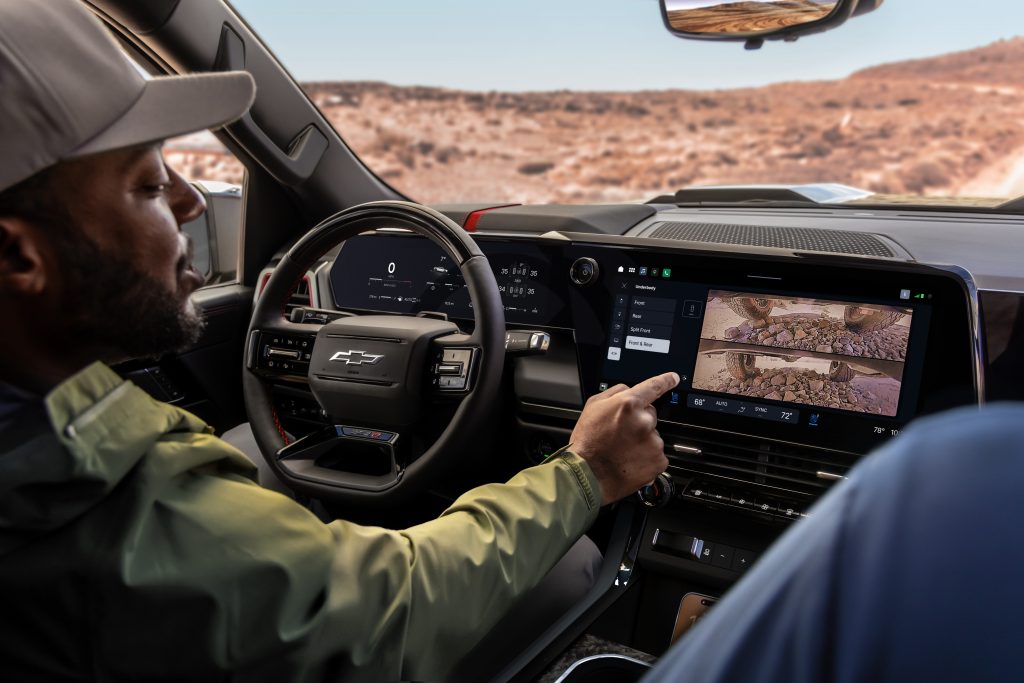
The trucks also have the usual array of cameras around the vehicle. There’s a specific camera view of the hitch, making it easier to get into position to connect a trailer. Underbody cameras on the off-road models like the Silverado ZR2 and Sierra AT4X give a view of what sort of terrain you’re traversing. None of that is necessarily new in the industry or even to GM (the electric trucks already have these cameras), but it makes sense to expand the availability. Engaging off-road driving modes also pulls up pitch and roll information, tire pressures, and transfer case status in the cluster.
Over On The Passenger Side

The list of available media apps in the Google Play Store for vehicles is growing, and all of those apps can be displayed on the passenger screen. That 11.5-inch display is fixed in place on the Chevrolet, while GMC has an articulating panel that covers the lower half of the screen when it’s not being used. Available apps that can run on the passenger screen include YouTube and YouTube Kids, AMC+, DirectTV, Disney+, Hulu, iHeartRadio, SiriusXM, Tubi, TuneIn, ViX, and more.
GM claims all of this will run faster and smoother than on prior iterations of the system. GM hasn’t confirmed what platform this is all running on. We’re guessing that the trucks have been upgraded to one of the newer Qualcomm Snapdragon cockpit system-on-chip designs, either the Gen 4 or Gen 5, both of which support the functions found in these trucks.
The UX design we’re seeing so far makes a lot of sense and should make it easier for drivers to use these systems. In general, GM’s software does seem to have gotten much more reliable since the dark days of late 2023 when it had to issue a stop sale on the Blazer EV, but we’ll have to wait until we actually get some extended time behind the wheel of the new Sierra and Silverado to really judge the quality. That should come sometime in the next few months.
Top graphic images: GM


I had a Buick Envision rental last month, and the UX wasn’t bad. I too hate all the screen-centric design approach, but it wasn’t the worst implementation of that. The light switch being on the screen is annoying but wasn’t killer; 95% of drivers just leave their lights on Auto anyways. I was driving onto a Navy base, so you want to be nice to the guards and turn your lights off as you approach the gate. Two quick taps took care of it.
The most important feature was the responsiveness of the screen. Even a half second delay on something you’re trying to do quickly is grating, so they’ve made strides in that arena at least.
Sorry Sam. I didn’t spend much time reading after the first couple of paragraphs. I mostly do like your articles, and am happy to read them completely.
Until about a month or so ago, I looked forward to a new car to replace my 2017 model that has almost 150,000 miles. But the more I see and read about these screen dominated autos, the less I want one. I prefer buttons and manual input for what I want to do. I just don’t want voice control or want to have to take my eyes off the road to see where to touch a large screen with different menus.
Maybe in a few years, manufacturers will revert back to manual controls, or at least have duplicate manual controls, for all HVAC, audio, heated seats, etc. when my current car is fully used up. One can hope.
Ugh on this idea of “progress”…
I recently had a Chevy rental with this ‘feature,’ and I absolutely hated it. The icon is too small, so even though it was persistent I still had to focus on pressing the tiny thing. From what I’m seeing in the pictures, there hasn’t been much improvement on this.
I know this is a stretch, but maybe they should consider making the touch switch larger. Maybe so large that it has to be moved off the screen…perhaps in the form of a button, or even a knob.
Honestly, the GM knob control for headlights in my truck isn’t good either. It’s some weird return-to-center thing instead of just being a knob that you point at the selected setting. I don’t know if the touchscreen is worse, but fortunately I leave my headlights on auto 99.9% of the time anyway so this isn’t a big deal to me.
I’ve always been puzzled by the amalgamation of “Screens” and “Screens replacing physical controls” being the same universally bad thing.
The former is universal evil. The latter is just more info, while keeping the buttons and knobs. I’m all ok with that.
I also don’t mind a passenger screen, especially in a vehicle with a dashboard the size of a dining table. That’s a lot of real estate looking you blandly in the face. Rich Corinthian leather can only get you so far.
Not to mention that any youngster in the passenger seat will love it, as they take over the media controls one way or the other. Might as well dedicate it to their side.
I’m surprised to see Kash Patel in GM Marketing photos driving himself in a truck.
I thought he was a BMW/Private Jet guy.
Please ban this racist. What a comment.
It’s kind of sad that the 2027 WT models went to a larger screen. To me, the small screen was what would have drawn me to buying the WT model over the others. It looks like 2021 was the best year to buy one, though, as you could still get an actual ignition key along with hand-crank windows and manual locks.
$creen$
I can recall the transformation from the infotainment system from the Blazer EV when I got it early 2024 till now. More functions, a smoother transition between menus, I added CarPlay and now its perfect. What I like is that carplay takes the whole screen, you dont have a split screen but I can switch to other menus quick with shortcurts.
How much is the is the optional 12″ lower beltline, thinner A pillars, and bigger windows?
I can find you a 1999 Silverado for $2500, it has a few* miles on it though.
I’d bet that with a new motor, new seats and carpet and lots of service done to the vehicle systems, it would be a better *functioning* truck for 1/2 the price of a new one. Anyone with a screwdriver can add Carplay or Android auto to a car in a few hours.
Perhaps I should “refurbish” old trucks and sell them…
And that $2500 one actually ran, so you didn’t even need a new motor or transmission yet. At 400,000 miles you could possibly get years more driving out of it then put a new motor in.
The back tailgate handle was broken though
I’d replace that tailgate handle a few times before equalling one monthly payment on a new truck. Especially when the new one sits at the dealer for a while waiting on some warranty part or service with no loaner available.
Lower beltline is never coming back due to rollover crash requirements, same for thin A Pillars.
Take the screen away from the glovebox and the rest of that interior layout is a perfect amount of screen with real buttons.
“How about actual usable truck box length?”
“Sorry the best we can do is more touch screens”
This will work perfectly for years, right? I’m glad I am not driving a new vehicle. And more screens is exactly what a work truck needs. Yeah I’m aware most of these won’t be work trucks but still.
I still think the Ram setup would be perfect to standardize with one caveat. the vertical screen should exactly emulate your phone screen if you wish it to. Also RAM does a decent job of redundant hard buttons for many of the climate and radio controls and I feel like that is appreciated as well.
Eh, it’s trendy now for vehicles of that price and it’s easily removed when it goes out of fashion. The buyers of the high trucks just want all of the dumb gadgets so that they can brag to their friends at the country club that they have the fanciest truck. That’s why there’s speakers in the tailgate, multi-stage automatic running boards and mood lighting in the upper trims. All things that are just trendy but can be easily removed when the trend moves on
The screens are not easily removed. They’re the only option for manipulating several important functions. Easily upgradable infotainment is gone. The computer running the screen is core to vehicle function.
The secondary screen that only plays movies for the passenger is absolutely not critical for the car to function and it will easily disappear when the trend passes
My bad, I was talking about screens in general, rather than just the pass screen.
Nothing says worksite vehicle like a $70,000 luxury apartment on wheels with more screens than an Apple Store!
I suspect it is getting cheaper to make programs to talk to modules than actual gauges and knobs. Ford has upfitter programming soft buttons on the Sync3 to provide certain functions. It is basically ladder logic PLC stuff, but if they have an output wire to connect to with known amp ratings and interconnected directly to the State of Charge Hall Effect system then it makes some sense.
Touchscreens have been cheaper than physical buttons for a while now. Tesla wasn’t stupid- their “futuristic” touch screen only approach was a triumph of marketing that just so happened to shave quite a lot of cost off each unit.
I mean, if I’m spending all day every day using my truck for work, why wouldn’t I want it as nice, comfortable, and functional as possible? Is your office chair a piece of shit wobbly stool? You still rocking a tiny CRT at your desk? Or is your office actually comfortable and functional? Are your running shoes some uncomfortable crap? Or you spending good money for Hoka/Nike/Adidas/Brooks etc?
I mean, I don’t disagree with the sentiment of wanting a nice interior, but it is fascinating that most marketing is a bit hypocritical in how it portrays these trucks. Tough, hard working trucks, pulling things, and then super dirty all the time, wherein the reality is that a lot of the high end trucks are used as mobile offices (which makes a lot of sense).
Is it hypocritical though? It’s not like a bunch of screens on the interior make it unable to be touch, hard working, pull things, or get dirty.
While I think there are downsides to screens and prefer buttons, they also make it easier to clean the interior, generally get you a few features, and it looks like there’s still a good bit of buttons around.
And all of this ignores what the fuck these “hard working” individuals are supposed to do come the weekend. Are we really promoting that these people should have multiple vehicles just so they can have a bare-bones one on the job site (even if they are manual labor and not some sort of worksite administrator) to only have a different more comfortable vehicle that sees just weekend use?
Get over yourselves people. The WT trim still exists for those that want it, and it’s got fewer screens and a more basic interior.
This. Unless you’re buying a fleet of trucks for employees to use, who would one not want something nice? These are multiuse vehicles, they do double and evn triple duty as daily drivers, work vehicles, family vehicles, tow vehicles, etc.
And for the “why buy a truck you don’t use for work?” trope, one could say the same goes for most “sports car” buyers. How many people buy 911’s or whatnot as daily drivers, never to see a track or spirited driving.
“You dig ditches for a living. You don’t deserve to have cooled seats or Apple CarPlay.”
Blue collar workers deserve to be miserable. /s/
I think if Truck Guys weren’t so hyper-sensitive to being trolled the trolls (including me!) would move on. But alas, it remains effortless.
The percentage of trucks where this is true is below 5%. The vast majority are daily drivers for white collar employees doing at an office.
GM: *does this*
Everyone, to me: “why do you want a Slate when the Fathom is better in every possible way”
Because the inside of the Fathom is going to be some of this bullshit, right here. That’s why.
I’ll tell all the manufacturers the secret of what I want in a truck. A solid, reliable engine and transmission combination.
No no no. Research indicates you want screens. More screens. Screens screens screens. Have you seen the screens? Were you aware that you could get information from that somehow you lived just fine without for years, but now are basically a television, always present, always watching you – for your benefit of course – full of pictures and delights to make sure you’re looking at anything but the road and thinking about the 3 ton building you’re driving, or the running costs of that building, or how high your hood is, about the height of the price of diesel I would say, high enough to eclipse a human being body and soul while you’re typing in the address of a Home Depot you already know how to get to.
Please adjust your desires.
Can I also interest you in $5000?
Because that’s what you really want, right? Not affordable healthcare, a living wage or responsible regulation of our food supply chain?
No? No? None of those?
it can’t show you unsolicited advertisements without screens..
Can I have that on a poster or shirt please. I think you just posted the 2026 Declaration of Dependence.
All Hail the Algorithm.
does an LQ9 6.0 LS with a 4L80E fit that bill well enough? Nothing is perfect of course, but what is the benchmark here?
That and a decent size bed to do pickup stuff.
Are those haptic controls on the steering wheel?
Is GM shoving basic controls into the screen again? Like the headlights on the mid-size? I still think it should be a legal requirement that any basic safety related equipment should have mandatory physical controls.
The good news is NCAP is requiring physical buttons for essential controls if manufacturers want a 5 star rating. The bad news is it’s only Euro NCAP at the moment, so ‘Murican truck makers don’t have to care. Also, truck buyers really don’t seem to care about safety ratings either, so even if it comes to North America it still may not matter.
And I’m looking at that ’84 Toyota 4×4 truck a friend sent me like, man, so much simpler.
I’ve been slowly rebuilding an ’01 Tundra Access Cab five-speed 4×4. I have an aftermarket head unit with Apple CarPlay…and that’s it. I just want to be able to navigate music, podcasts and maps easily. I’ll adjust the HVAC with three knobs just below it all day long…
But think of the passenger! What ever will THEY do?!?!
Stare off into space and wonder which of my sh*%box vehicles they’re going to be forced to ride in when the current sh#*box breaks.
Are you suggesting that they use their imagination? For the love of god someone call CPS.
I’ve given them enough tactile sensations that they can rely on memory more than imagination…a 32 year old Jeep Grand Cherokee has a specific olfactory and auditory pattern that it’s easy to recall while riding in a 22 year old Honda Element, having recently fled from a 25 year old Toyota Tundra with a broken passenger side LBJ.
I mean, you watch your boss get assassinated and tell me you won’t feel a little messed up, too.
Bravo, lol.
Can I tell you how many times I’ve cursed having to replace my Front Diagonal Relay?
Watch…or order your boss assassinated? Either way, it explains quite a bit of his personality issues…
It had been 14 years since I had been in a ZJ Grand Cherokee, I instantly recalled the familiar feel of the door handle pull and the sound of the door closing.
I’m glad it brought back such fond memories.
Can I have that fleet please? I wouldn’t call them sh%tboxes.
I’ve been daydreaming of an old Toyota truck or an Element. I was watching a carsandbids auction on an Element as it sailed up to $7500…Which seems reasonable in 2026, but the old guy in my head screams that it’s a $3000 vehicle all day long.
Looking at monthly payments on a new vehicle quickly makes fixing an older one make good sense. I recently spent $50 on a stereo that had bluetooth but no touchscreen. Score! It plays those disc things too that are compact.
This is my fleet:
1973 Volvo 165
1980 Rover 3500/SDI
1992 Ford Sierra (from Argentina)
1994 Grand Cherokee
2001 Ford Focus ZX3
2001 Volvo V70 T5
2001 Toyota Tundra
2004 Honda Element
All manual transmissions, too!
Living the dream! A great fleet.
Oops.
I don’t foresee much need for the passenger screen, but the main screen updates and changes seem well thought out and executed.
Getting more and more optimistic about these trucks.
Opinions seem to be a mixed bag on the looks, but I think these will dethrone the Ram when it comes to best looking full-size.
I tend to agree with you there.
They do look good, that’s for sure
The front end is still super busy, but far less offensive than before. The profile is clean.
The front end is my least favorite bit, but looks better in non-ZR2 trims, and is an huge improvement over the previous generation in all trims.
The side profile is great, and I’m glad they got rid of the dumb kick in the back windows.
Overall, looks-wise, I’d take a Custom or a Custom Trail Boss trim.
If the passenger is watching a video, do they have their own speakers or is the driver distracted to the tune of “Let it gooooooooooooooooooooo” piped through the whole cabin?
Genuinely, this is just an extension of people using pickup trucks instead of minivans to transport their kid to soccer, so now need to distract the person beside them.
What ever happened to talking to your kid for the 17 minutes it takes to get to soccer?
What kid, these days, isn’t already buried into their phone?
Talking must be a millennial thing. We neglected GenXers just rolled around in the cargo area of the wagon unfettered by seat belts while dad angrily muttered to the AM talk radio.
or the truck bed. I spent lots of time in a truck bed as a kid. Luckily less cigarette smoke.
No talking when Don and Mike is on in dad’s car.
Between the heat, the fumes and the droning of the differential we were long passed out anyway.
Some people still do.
We keep “entertainment” type things like tablets to only long trips (2 or more hours one way). There’s enough screens in these kids lives. The car should be a pleasant place to decompress from all the tech.
Same! And on long trips we don’t let them power up until after the first hour of driving. There is so much value to being alone with your thoughts, and the car is one of the few places left where that can still happen for these kids.
Yeah and it’s not like the experience of being in a car in 2026 without TV or games is like prison or anything. This is a pretty comfy and quite minivan. We have XM radio and Spotify available to us. Big windows to see the world pass by (I think this is actually one of the big reasons why people have become so dependent on screens to keep their kid entertained in cars, a lot of backseats are dark and practically windowless these days). It also helps that they don’t spend much of their week in vehicles (walking, no bussing school district), small city with most amenities within a couple of miles) so we’re not like some of my coworkers who spend 25% of their waking lives in cars.
We can finally have Subway Surfers play in the background while driving, quite the advancement if you ask me.
That dashboard seems really tall.
Something else to break.